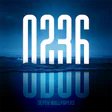
Depth Wallpapers & Live Clock
JustNewDesignsPersonalization
4.5401.00 Reviews
- Version
- 2.1.06
- Installs
- 1.00M
- Age Rating
- Everyone
Screenshots






Our Review of Depth Wallpapers & Live Clock
 Analysis by Appyee
Hey there! So, I recently got my hands on this cool app called Depth Wallpapers & Live Clock, and I’ve been playing around with it for a bit. Let me tell you, if you’re into customizing your phone’s look, this might just be your new favorite app. Here’s the lowdown on what I discovered after diving into its features.
Transform Your Screen with Stunning Depth Effects
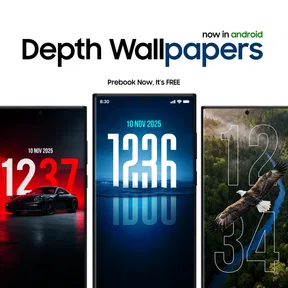
First off, let’s talk about the wallpapers. The app offers a robust collection of wallpapers that use depth effects to create a 3D-like experience on your phone. I was instantly impressed by how the images seemed to pop and move as I tilted my device. It’s like having a mini hologram right in your pocket!
The app categorizes wallpapers into different themes, so whether you’re into nature, abstract art, or sleek geometric designs, there’s something here for everyone. I spent an embarrassingly long time just swiping through the collections, trying to decide which masterpiece to grace my home screen with. The variety ensures you’ll never get bored, and you can switch things up whenever the mood strikes.
Live Clock Feature: More Than Just Time
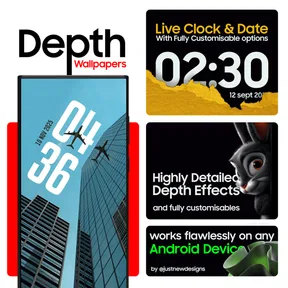
Now, onto the Live Clock feature. I wasn’t expecting much beyond the typical clock display, but boy, was I in for a surprise! These aren’t just any clocks; they’re beautifully designed and come with customizable options. You can adjust the style, color, and even the animation speed to fit your aesthetic.
One of the standout options was a galaxy-themed clock where the hands of the clock appeared to orbit around planets. It’s a small detail, but it adds a unique touch that kept me checking the time more often than usual. If you’re someone who appreciates the little things, this feature will definitely catch your eye.
Easy Navigation and User-Friendly Interface
Let’s face it, no matter how good an app looks, if it’s a headache to use, it’s not going to last on my phone. Luckily, Depth Wallpapers & Live Clock excels in the usability department too. The interface is clean and intuitive, making it easy to browse through wallpapers and set them as your background with just a few taps.
The app doesn’t bombard you with ads, which is a huge plus in my book. There are some in-app purchases if you want access to premium content, but the free versions are more than enough to keep you entertained. Plus, the app is lightweight, so it didn’t slow down my phone at all, which is always a bonus.
Customization and Personalization
If you’re someone who loves to personalize every inch of your device, this app has you covered. You can mix and match wallpapers and clocks to create a look that’s uniquely yours. I had a blast experimenting with different combinations, and the app makes it easy to preview changes before committing to them.
Furthermore, the app updates its library regularly, so you’ll always have fresh content to choose from. I appreciate a developer that keeps things current—there’s nothing worse than an app that gets stale over time.
Conclusion: A Must-Have for Personalization Enthusiasts
All in all, Depth Wallpapers & Live Clock is a fantastic app if you’re looking to spice up your phone’s appearance. The depth-effect wallpapers are stunning, the live clocks are a fun touch, and the user experience is top-notch. Whether you’re a customization junkie or just want to try something new, this app is definitely worth a download.
So, why not give it a shot? It’s free to try, and who knows, you might just find your next favorite wallpaper or clock design. Happy customizing!
Verdict
Strengths of Depth Wallpapers & Live Clock
- High-quality HD wallpapers available.
- Wide variety of categories and themes.
- User-friendly interface with easy navigation.
- Customizable live clock widget options.
- Regular updates with new content.
Limitations of Depth Wallpapers & Live Clock
- Contains ads that can be intrusive.
- Limited offline access to features.
- Some premium content behind paywall.
- Occasional bugs affect performance.
- Battery drain with live wallpapers.
Other Releases by JustNewDesigns
View All
LineX Icon Pack
Personalization4.5

Everything Widgets
Personalization4.6

LineX White Icon Pack
Personalization4.5

Glass Widgets Pro
Personalization4.7
Similar Picks in This Category
View All
Microsoft SwiftKey AI Keyboard
SwiftKey4.3

Wallpapers
Google LLC4.1

Zedge™ Wallpapers & Ringtones
Zedge4.7

Yandex Browser with Alice AI
Direct Cursus Computer Systems Trading LLC4.3

Ringtone Maker:create ringtone
Big Bang Inc.4.7

Fonts Keyboard
Fonts Keyboard3.9
Frequently Asked Questions
What features does Depth Wallpapers & Live Clock offer?
Depth Wallpapers & Live Clock provides a wide range of stunning 3D wallpapers and customizable live clocks for your device. Users can choose from a variety of themes and styles to personalize their home and lock screens. The app also includes interactive elements and real-time updates to keep your display fresh and dynamic.
Is Depth Wallpapers & Live Clock compatible with my device?
Depth Wallpapers & Live Clock is designed to work on most Android and iOS devices. However, it is recommended to check the app’s compatibility on its download page before installation, as some older devices may not support certain features or live animations effectively.
Does Depth Wallpapers & Live Clock consume a lot of battery?
While live wallpapers and animations can use more battery than static images, Depth Wallpapers & Live Clock is optimized for minimal battery consumption. The app uses efficient algorithms to ensure that it does not significantly drain your device’s battery, but it’s advisable to monitor usage if you experience any issues.
Are there in-app purchases or ads in Depth Wallpapers & Live Clock?
The app offers a free version that includes basic features and some ads. For an ad-free experience and access to premium wallpapers and advanced customization options, users can opt for in-app purchases. These purchases enhance the app’s functionality and provide a more personalized experience.
How do I set a wallpaper or live clock using the app?
Setting up a wallpaper or live clock is straightforward. After selecting your preferred wallpaper or clock design within the app, simply tap the ‘Set’ button. You can choose whether to apply it to your home screen, lock screen, or both. The app guides you through each step to ensure a seamless setup.
